
Link Clicks vs Sessions: Why the Numbers Differ
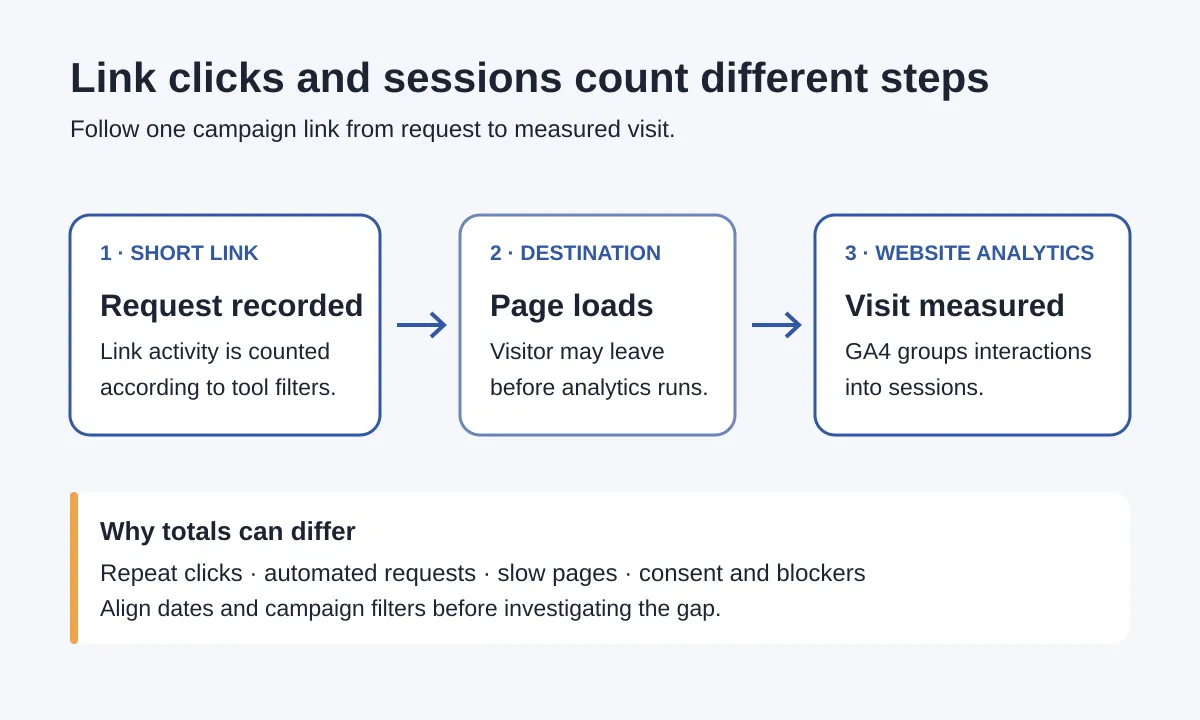
Link clicks vs sessions is a comparison of two different measurement points: activity at a shared link and visits measured on the destination website. Repeat clicks, automated requests, page-loading problems and analytics consent settings can make the totals differ. Start by matching the reporting period and campaign scope, then test the link’s path to the landing page before treating the gap as a tracking failure.
What is the difference between link clicks and sessions?
A short-link click is activity recorded when the short-link service receives a request, subject to that service’s counting and filtering rules. A GA4 session is a period of interaction with your website or app. Neither metric is a count of completed orders.
One person can click twice during one visit. GA4 doesn’t necessarily start a new session each time: by default, a session times out after 30 minutes of inactivity, according to Google’s session documentation. You can change that timeout, so check your property’s setting when investigating repeat visits.
A request can also reach the shortener without a measurable website visit following it. Google’s clicks and sessions troubleshooting guide, written for Google Ads, explains the same downstream failure: someone may leave before the landing page’s analytics code loads.
Align the reports before looking for missing visits
Write down what each number includes. Comparing all-time short-link clicks with this week’s campaign sessions creates a gap even when both tools work correctly.
- Use the same completed date range. Match time zones, or note the difference around the start and end of the period. Avoid comparing a live counter with a report that is still processing.
- Match the link and campaign scope. Include only the short links assigned to that campaign. Check whether other links use the same UTM campaign name and could contribute website sessions.
- Choose Sessions, not Users or Engaged sessions. Those metrics answer different questions. Use session-scoped campaign and source/medium dimensions for a campaign-visit comparison.
- Limit website data to the intended destination. A property covering several sites or subdomains can include unrelated traffic. Check the hostname and landing page as well as the campaign.
Google’s User acquisition versus Traffic acquisition guide explains why first-user dimensions describe how someone was originally acquired, rather than the campaign bringing their current session. Start with Traffic acquisition for this comparison; report navigation can differ between properties.
For the naming setup, see our UTM tracking guide for QR codes, email and social. Keep those labels stable while investigating, so a rename doesn’t split your results.
Check the cause that fits the pattern
| Pattern you notice | Possible explanation | Next check |
|---|---|---|
| Several clicks close together | Repeat taps or automated checks | Review timestamps and any bot classifications the link service provides |
| Activity appears immediately after an email send | Security scanners or previews may request links | Compare the timing with the send; timing alone doesn’t prove bots |
| The final page opens but campaign sessions are low | Campaign labels may be lost or mismatched | Inspect the final URL and the exact campaign filter |
| A phone visit fails or loads slowly | Visitors may leave before measurement | Open the shared link in the same app and test the landing page |
| Measurement changes with consent or browser settings | Analytics collection may be restricted | Test consent behavior and tag requests without bypassing visitor choices |
Automated traffic is a possibility, not a default explanation for every unexplained click. Ortto’s documentation describes email security checks that can inflate click counts without generating sessions. Your shortener may filter them differently.
GA4 automatically excludes known bots and spiders, but doesn’t show how much traffic that exclusion removed. You can’t subtract a precise bot total from GA4 to reconcile the reports.
Consent also needs a careful reading. Declining analytics cookies doesn’t always mean no data is sent: advanced consent mode can send cookieless pings. Behavioral modeling has eligibility requirements. Check your implementation rather than assuming every unconsented visitor either disappears or is fully counted.
Work through a workshop campaign example
Say a creator promotes a December pottery workshop using one newsletter link. For a completed seven-day period, the short-link report shows 120 clicks, while GA4 shows 82 sessions for the workshop campaign. These are example numbers, not customer results.
The arithmetic gap is 38, but that does not establish 38 lost visitors. Here’s how to investigate:
- Confirm that the 120 clicks belong only to the newsletter link, and that both reports cover the same seven days and time zone.
- Check that the 82 is Sessions filtered to the intended campaign and destination, rather than first-user campaign or all website sessions.
- Open the copied newsletter link on a phone. Confirm the workshop page loads and the expected UTM labels remain in the final address.
- With a site owner or developer, use the analytics debugging tools to check that the destination tag sends events after consent is granted. Test declined consent separately to verify the configured behavior. Record the test time because your own activity may enter reports.
- Review any available click timestamps and automated-traffic labels. Keep unexplained activity separate from requests positively classified by the service.
Suppose the phone test reveals that a redirect removes the campaign labels. Fixing the redirect may move future visits into the correct campaign report; it doesn’t mean those earlier visits never reached the website. Retest after the fix and compare a new completed period rather than changing the old count by hand.
What should you report when the totals still differ?
Report both metrics with their names and scope. For the example, a useful summary is: “The newsletter short link recorded 120 clicks; GA4 reported 82 workshop-campaign sessions for the same seven days. The redirect test found missing campaign labels, which we corrected for future visits.”
If you haven’t found a cause, say the gap remains unexplained. Don’t label every unmatched click a bot, abandoned visit or lost sale.
Use clicks to describe shared-link activity, sessions to describe measured website visits, and your booking or order system to report completed business outcomes. A sessions-to-clicks ratio can help flag changes within the same campaign setup, but it isn’t a conversion rate or a universal tracking-quality score.
URLKai’s Link Shortener provides click tracking and campaign organization for the shared-link side of this comparison. Keep the destination website’s session and booking reports alongside it rather than expecting one counter to replace the others.