
How to Create a Custom Short Link and Track Campaign Clicks
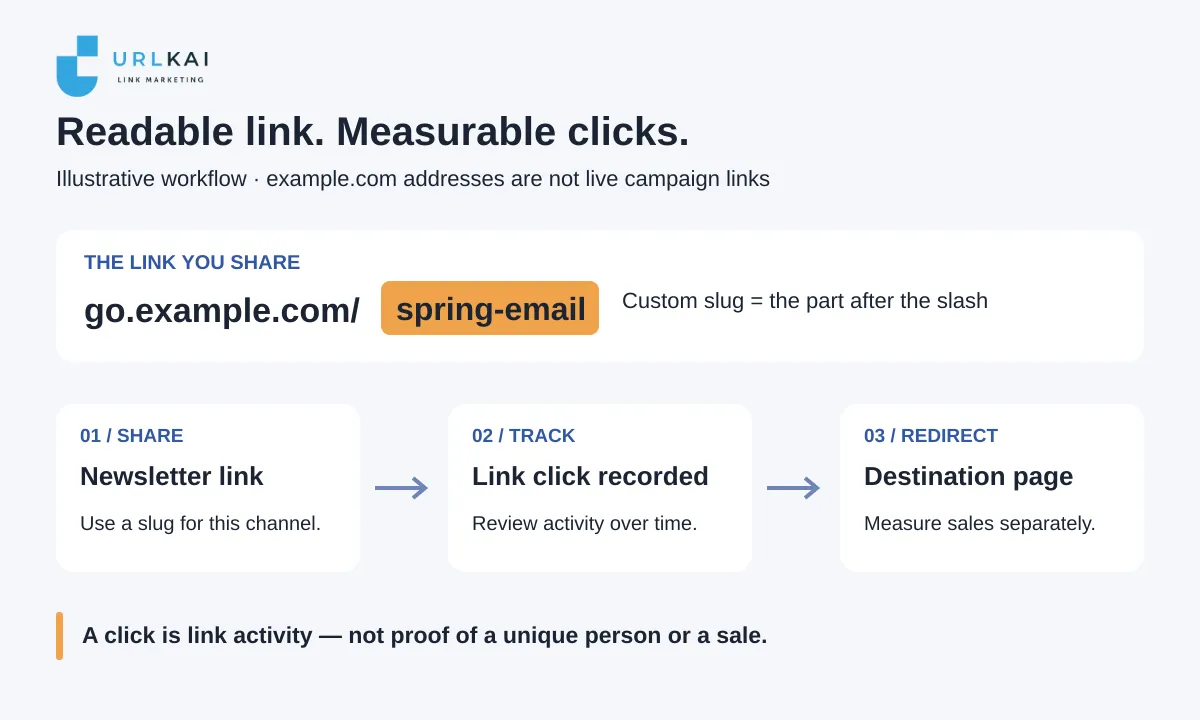
To create a custom short link, choose the page you want people to visit, replace the random ending with a readable slug, and test the redirect before sharing. Use a separate link for each campaign channel if you want to compare clicks. Click tracking measures activity on those links—not completed purchases or a guaranteed number of people.
What is a custom short-link slug?
A custom slug is the text after the slash in a short link. In go.example.com/spring-email, the slug is spring-email. A custom domain changes the address before the slash; changing the slug alone does not give you your own branded domain.
A readable slug tells someone what to expect. A creator might use new-episode; a local shop might use spring-menu. Keep the words tied to the destination rather than a vague label such as click-here.
All addresses and campaign results in this guide are illustrative. The example.com addresses are placeholders, not working campaign redirects or customer data.
How to create a custom short link
1. Choose the exact destination page
Send people to the page that delivers the promise in your post or email. For a spring collection, use the collection page rather than a homepage that makes visitors search again.
For example, a small shop could start with:
https://shop.example.com/collections/spring
Open the destination yourself. Check that it loads on a phone, shows the right offer, and does not require a login unless that is intentional. Never put passwords, private access tokens or personal information in a public campaign URL.
2. Pick a readable slug
Use a few plain words that are easy to read aloud and type. Lowercase words separated by hyphens are a practical starting point; the shortener determines which characters and lengths it accepts.
| Campaign | Slug idea | Why it works |
|---|---|---|
| Creator’s latest episode | new-episode |
Names the content |
| Shop’s spring newsletter | spring-email |
Names the offer and channel |
| Workshop promotion | june-workshop |
Distinguishes the event |
If your first choice is unavailable, add a meaningful detail such as the month or campaign name. Avoid random extra digits that make the link harder to remember. A slug on a shared domain may already belong to another user.
3. Create the link and set the slug
In your shortener’s link-creation form, paste the full destination URL and choose an available short-link domain. Set the custom slug, sometimes called an alias or back-half, then save the link. Copy the resulting short URL rather than assembling it by hand.
For the newsletter example, the intended result would look like:
https://go.example.com/spring-email
The slug makes the shared link readable; the redirect still sends the visitor to the full destination URL. You do not need to change your website’s own page address.
4. Test before publishing
Open the copied short link in a fresh browser tab and on your phone. Confirm the final page, not just that the short link opens. If you added campaign tags, check that they survive in the destination URL.
Test the link from a draft of the actual email or social post too. This catches copying mistakes and punctuation accidentally included in the link. Record when you ran these tests: your own visits may appear in the click count.
Track campaign clicks with a separate link per channel
One link shared everywhere gives you a combined activity count. Separate links make channel comparisons easier, even when they lead to the same page.
For the shop’s spring collection, use a small naming plan:
| Placement | Illustrative short link | Destination |
|---|---|---|
| Newsletter | go.example.com/spring-email |
Spring collection |
| Social profile | go.example.com/spring-social |
Spring collection |
Keep a note of each link’s placement and launch date. If the same link is reused across several placements, its total alone cannot tell you which placement caused the activity. Referrer reports can help, but some apps and browsers omit that information.
If you use analytics on the destination website, add UTM parameters before shortening. These are campaign labels that help compatible website analytics tools identify traffic sources. A newsletter destination might be:
https://shop.example.com/collections/spring?utm_source=newsletter&utm_medium=email&utm_campaign=spring
Use consistent names across the campaign. Google’s guide to collecting campaign data with custom URLs explains how those labels work. A shortener’s click report and your website’s analytics measure different events, so their totals need not match.
What do link clicks measure—and what don’t they?
A recorded link click is activity at the short link. It does not prove that someone read the destination page, subscribed, or bought anything. Repeat visits, your own tests, automated link previews and security checks can affect counts, depending on how the service filters them.
For example, suppose the newsletter link records 40 clicks and the social link records 25 clicks during the same seven days. The newsletter link recorded more activity in that window. That does not establish 65 different people, more sales from email, or a higher click-through rate: you would also need audience or impression counts to calculate that rate.
Use the reports to decide what to investigate next:
- Compare the same date range, accounting for different launch dates.
- Look for activity after a specific send or post.
- Note your test visits and any unusual spikes before drawing conclusions.
- Measure purchases or signups in your store or website analytics, with conversion tracking configured there.
If clicks rise but purchases do not, check the destination page, offer and checkout rather than treating the click count as the outcome.
Create your first campaign link with URLKai
URLKai’s Link Shortener supports custom slugs, custom domains and click tracking. Start with one destination and one readable slug, test the link, then add a second channel-specific link when you have a comparison to make.
Get started free. URLKai offers a free-forever plan with no credit card required. Plans have feature and usage limits; the current Free listing includes 10 short links, 1,000 monthly clicks and 15-day data retention. Check current plan details for the capabilities you need, and review results while they remain available.